SIP Search

Indiabulls Ventures’ customer can register SIP on trading platform PIB and Trading Website under section-Mutual Funds->SIP->Start SIP.
How to Search Scheme:
SIP Search window displays the list of schemes in which SIP can be registered. SIP schemes can be searched by following the below steps:
-
Go to SIP under Mutual Fund Segment
- Click Start SIP
You will be redirected to scheme search window to search scheme in which you wish to register a SIP.
- Select Fund House
- Select Fund Category or Enter Scheme Name (Please enter at least 3 characters in “Search Scheme field” )
- Click Search to search schemes for selected AMC.
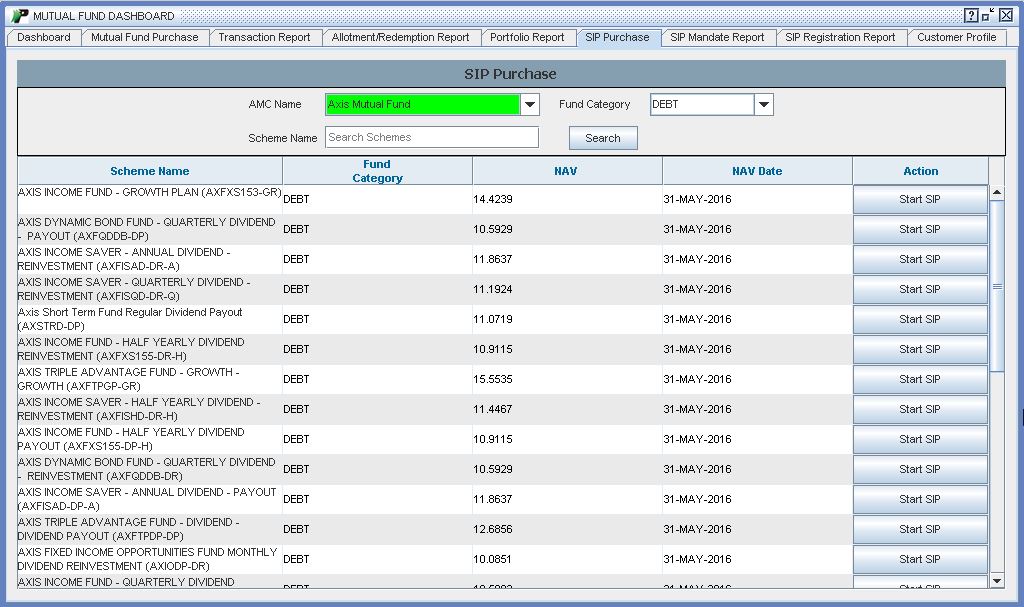 |
SIP Search window would display the following details:
-
Scheme Name - It displays the name of schemes available for SIP under the selected Fund House.
-
Fund Category - It displays the name of the category in which scheme belongs to .
-
Net asset value (NAV) -It displays the latest NAV Available.
-
NAV Date -Date at which latest NAV is available.
Action - Click Start SIP for registration.