SIP Registration

Once you choose scheme and click “ Start SIP” button, it will take you on SIP registration form. Here you need to fill the following mandatory fields:
- Scheme Name - it’ s a pre populated filled as selected for SIP.
- Fund Category - Fund Category- Displays the category of the selected scheme.
- Frequency- Select Frequency from the list.
- Amount - Enter valid amount.
- No. Of Installments- Enter number of installments.
- SIP Date: - Select date from the list you wish to start SIP.
- SIP Start Date: - This field displays the nearest SIP date you selected to start SIP. E.g If you have chosen SIP date as “5” and on 25th May 2016, then the “SIP Start Date” would be 5th June 2016.
- SIP End Date - It is a auto calculated field derived from SIP start date and number of installments.
- Select Mandate Id - Please select the mandate id from dropdown list.
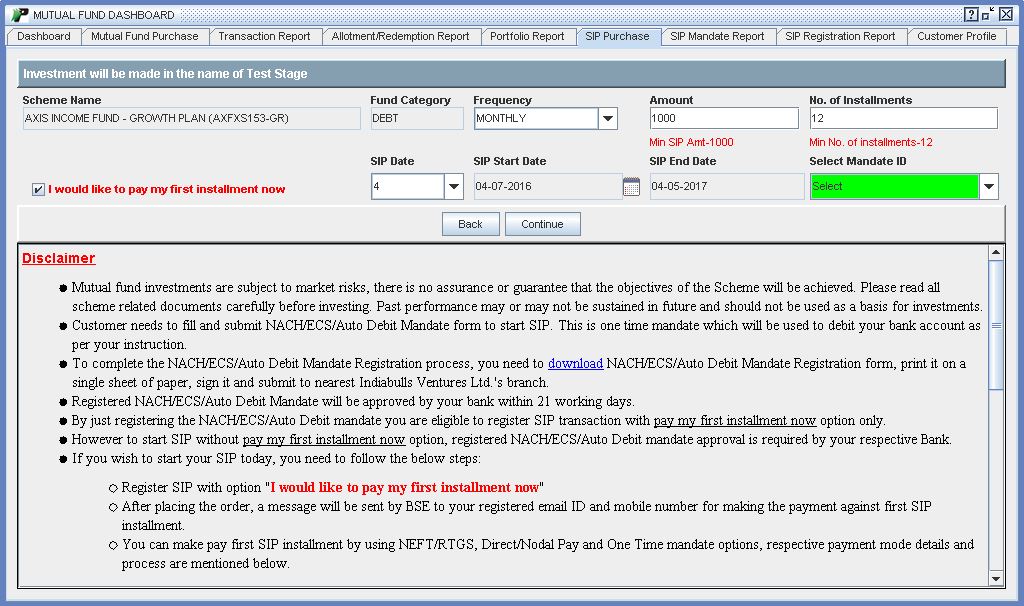 |
Note: You can start your SIP from today itself by selecting “I would like to pay my first installment now” option available on the SIP registration form. Since you want to start your SIP from today itself and want to entitled for today’s NAV, please ensure payment for first installment should be credited in BSEStarMF account by T+1 day 9:30 AM.
After entering all mandatory fields you will be asked to confirm your transaction and accept terms and condition to complete the registration process.