SIP Execution Log

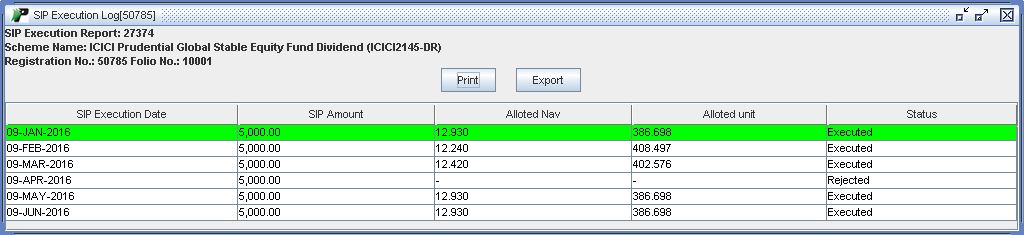
SIP execution report available from SIP Registraion Report. By clicking on SIP Registration Number on the respective report, Execution Log Report window will appear on the screen.
 |
Output Field
-
Scheme Name - Scheme in which SIP is registered.
-
SIP Registration Number- This is a unique id being assigned by the exchange against the SIP. We will get this in response of SIP registration request.
-
Folio Number - This would be provided in allotment File once allotment is done.
-
SIP Execution Date - It is a date at which SIP amount will be deducted from the client's account.
-
Installment Amount - It is also know as SIP Amount which to be debited from client’s account.
-
Alloted NAV - It displays Allotted NAV.
-
Allotted Units - It displays Allotted Units.