Mutual Fund Transaction Report

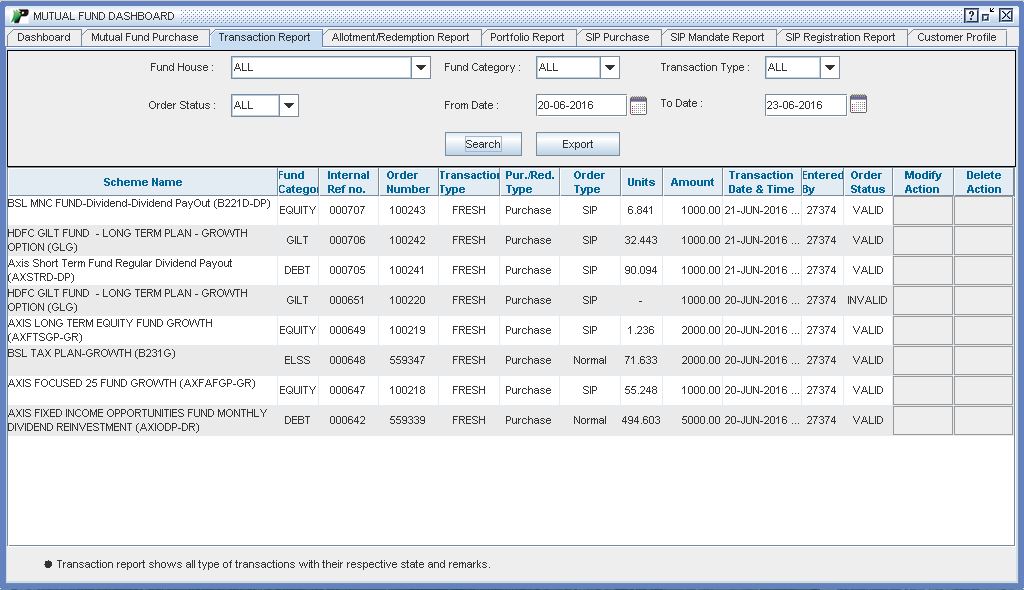
In this report there are some categories so that user will select fields according to their criteria these categories are Fund House, Fund Category, Transaction Type, Order Status, From Date and To Date. User have to select one of the entry through drop down after completing this process there will be a search button through this button user will search the available entries. After successful search it will shown two buttons first one is Modify and second one is Delete. Through Modify button user will Modify the given entry and through Delete button user will Delete the given entry.
 |
Input Field :
- Fund House - List of Fund house in which transaction are made. In this field by default “All” is selected.
- Fund Category - It is based on the AMC selected. By default All Category is filtered.
- Transaction Type -In this field three categories are given like Purchase, Redeem and Additional Purchase.
- Date Range -In this field by default one month date will be populated. There is no restriction for Period on Transaction report for filtering data. User can choose any time line for the same.
- Search Button - All above filter applied would worked on pressing “Search” button.
After pressing search button some fields gets populated like::
Output Field :
- Scheme Name - - It is the name of the Scheme in which transaction is done.
- Fund Category - It display the category name to which scheme name belongs.
- Internal Reference no - Internal unique no. assigned against an order while sending to exchange.
- Order No - It display Exchange order number received on confirmation.
- Transaction Type - - There are three Transaction Type like Fresh Purchase, Redeem, and Additional Purchase.
- Order Type -It display order type like Normal or SIP
- Unit- It is updated for redeem transaction only if users redeem their holding in unit.
- Amount - It display Transaction Amount.
- Entered By - In this field we have to know that Who will place the order.
- Order Status - It display whether transaction is valid or invalid.
- Modify -To Modify Transactions. To know more about Modify, click here…
- Delete-
To Delete Transactions. To know more about Delete, click here…