Mutual Fund Allotment/Redemption Report

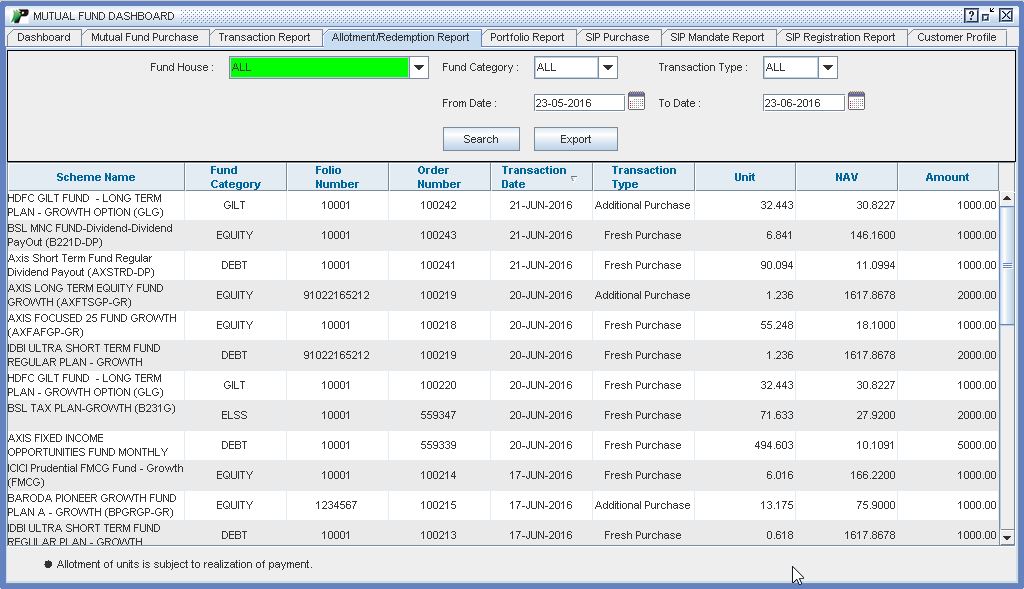 |
This report is available Under Mutual Funds menu and contains all the transactions for which Allotment/Redemption has been done. There are some filters in Allotment/Redemption report:
Input Field :
- Fund House - List of Fund house in which transactions are made. In this field by default “All” is selected.
- Fund Category - It is based on the AMC selected. By default All Category is selected.
- Transaction Type -It will display transaction type like Fresh Purchase, Redeem and Additional Purchase.
- Date Range - There is no restriction
for period on transaction report for filtering data. Default one month data will be populated.
- Search - Click Search button to apply all above mentioned filters
Output Field :
- Scheme Name - It displays the scheme name in the applied filter category.
- Fund Category - It displays the selected fund category name.
- Folio No - Unique number assigned by respective AMC.
- Transaction Date - It displays the transaction date.
- Transaction Type - It will show Fresh Purchase/Additional Purchase/Redemption based on the nature of the transaction.
- Unit -It displays Allotted Units.
- NAV - It displays Allotted NAV.
- Amount - It displays Investment Amount.